GitHub Actions - Building a CI Pipeline for React.js Applications
This CI Pipeline will run several workflow jobs such as PR Build Check, Automatic tag & release with semantic versioning, and perform Build and Push Container Image to GitHub Container Registry (GHCR).
#Introduction
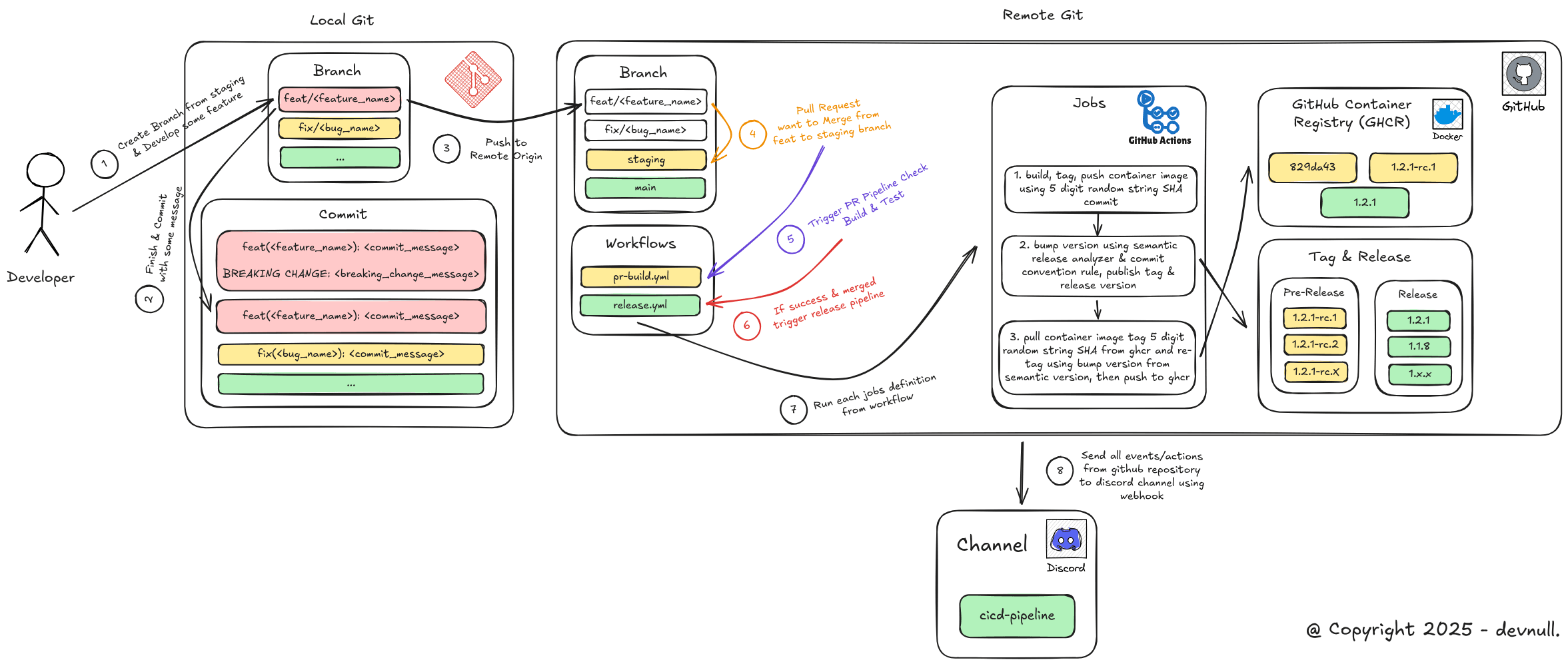 Concepts
In this blog post, we will try to build a CI Pipeline using GitHub Actions for applications created using React.js technology, where the ultimate goal is to run automation starting from:
- Build & Test Pull Request Check
- Automatic tagging & release using semantic versioning based on conventional commit rules
- Build & Push Container Image to GitHub Container Registry (GHCR)
- Integrate GitHub Repository with Discord using WebHook
However, before attempting to create one, we will first discuss the definitions of each component that we will build:
#What is a CI/CD Pipeline?
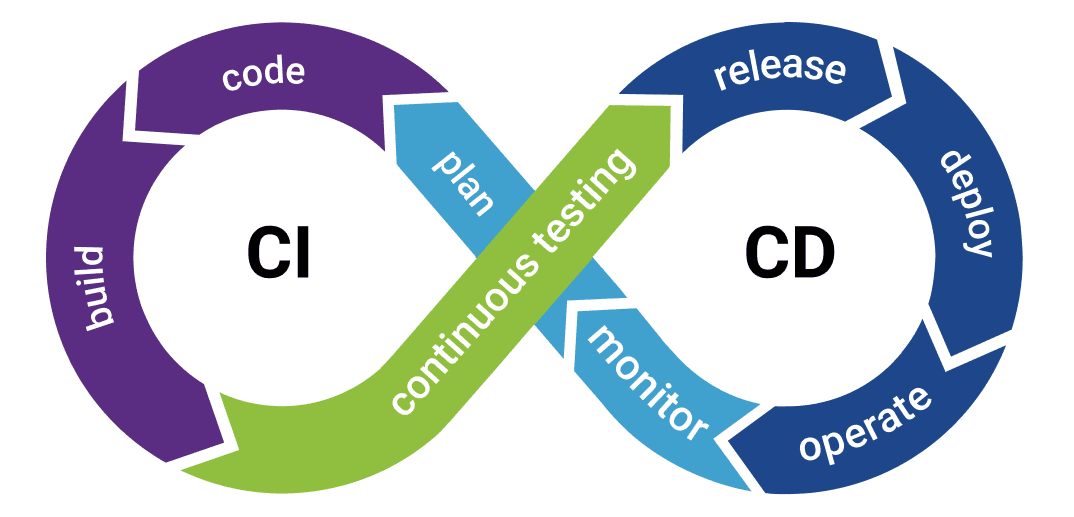 CI/CD
CI/CDCI/CD Pipeline, short for Continuous Integration (CI) and Continuous Delivery/Deployment (CD), is an automation process that streamlines software development from code changes to deployment. This process automates the steps of building, testing, and deployment, allowing developers to release code changes more frequently, reliably, and securely. This pipeline runs automatically every time code is updated in the central repository, and continues through various stages until the code is active in the production environment. The process will stop and notify the team if any stage fails or succeeds.
#What are Semantic Versioning, Conventional Commit, and Git Flow (SDLC)?
Note: For reading references related to Semantic Versioning, Conventional Commit, and Git Flow (SDLC), I have posted on LinkedIn and implemented it in GitLab Repository.
#Semantic Versioning
Semantic versioning, or SemVer for short, is a software version numbering standard defined at semver.org. Its purpose is to avoid dependency hell and ensure that compatibility between versions can be understood consistently by developers and users alike.
Semantic Versioning is written using this format:
MAJOR.MINOR.PATCHThere are three main components in semantic versioning.
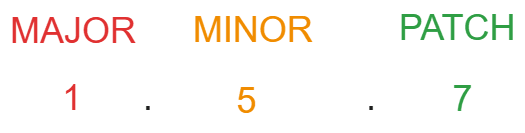 Semver Component
- MAJOR
This is the first component, where the number increases when there are changes that are not backward compatible, commonly referred to as breaking changes. An example is a version increase from v1.5.7 to v2.0.0.
- MINOR
This is the middle component, where the number increases when there are new feature additions that are still backward compatible. An example is a version increase from v1.5.7 to v1.6.0.
- PATCH
This is the final component, where the number increases when there are bug fixes or minor changes that are still backward compatible, such as fix, hotfix, and so on. An example is a version increase from v1.5.7 to v1.5.8.
#Conventional Commit
In addition to version numbering standardization, semantic versioning is also closely related to commit standardization. This is because it is based on the commit message that will detect which level should be bumped or upgraded, whether it is MAJOR, MINOR, or PATCH.
Usually, this commit convention refers to development in well-known repositories such as angular, where there are several types of commit message rules, such as:
BREAKING CHANGE
This commit message rule will increase or bump the version to the MAJOR level, where usually the location of this commit message is in the footer or at the bottom of the commit message. An example of a commit message is as follows
Note: The writing format or rules for
BREAKING CHANGEare agnostic, so it can be attached to any commit message, as long as it contains the keywordBREAKING CHANGEand is usually located in the commit footer.
# Writing format
feat(<feature_name>): <commit_message>

BREAKING CHANGE: <breaking_change_message># Example of use: 1
feat(api-version): change endpoint to api version v2
BREAKING CHANGE: THIS FEATURE IS NOT BACKWARD COMPATIBLE# Example of use: 2
hotfix(api-response): fix wrong response format on user detail endpoint
BREAKING CHANGE: response structure has been changed, `fullName` field is removed
and replaced with `firstName` and `lastName`. This change breaks existing clients.feat()
This commit message rule will bump the version to the MINOR level, which usually has the prefix feat(). An example of a commit message is as follows:
# Writing format
feat(<feature_name>): <commit_message># Example usage
feat(hooks): add map update (mutation) hookfix()orhotfix()
This commit message rule will increase or bump the version to the PATCH level, which usually has the prefix fix() or hotfix(). An example of a commit message is as follows
# Writing format: 1
fix(<bug_name>): <commit_message>

# Writing format: 2
hotfix(<bug_name>): <commit_message># Example of usage: 1
fix(login-validation): resolve incorrect email format validation on login form
# Example usage: 2
hotfix(api-timeout): fix API timeout error on fetch user profile endpoint#Git Flow (SDLC)
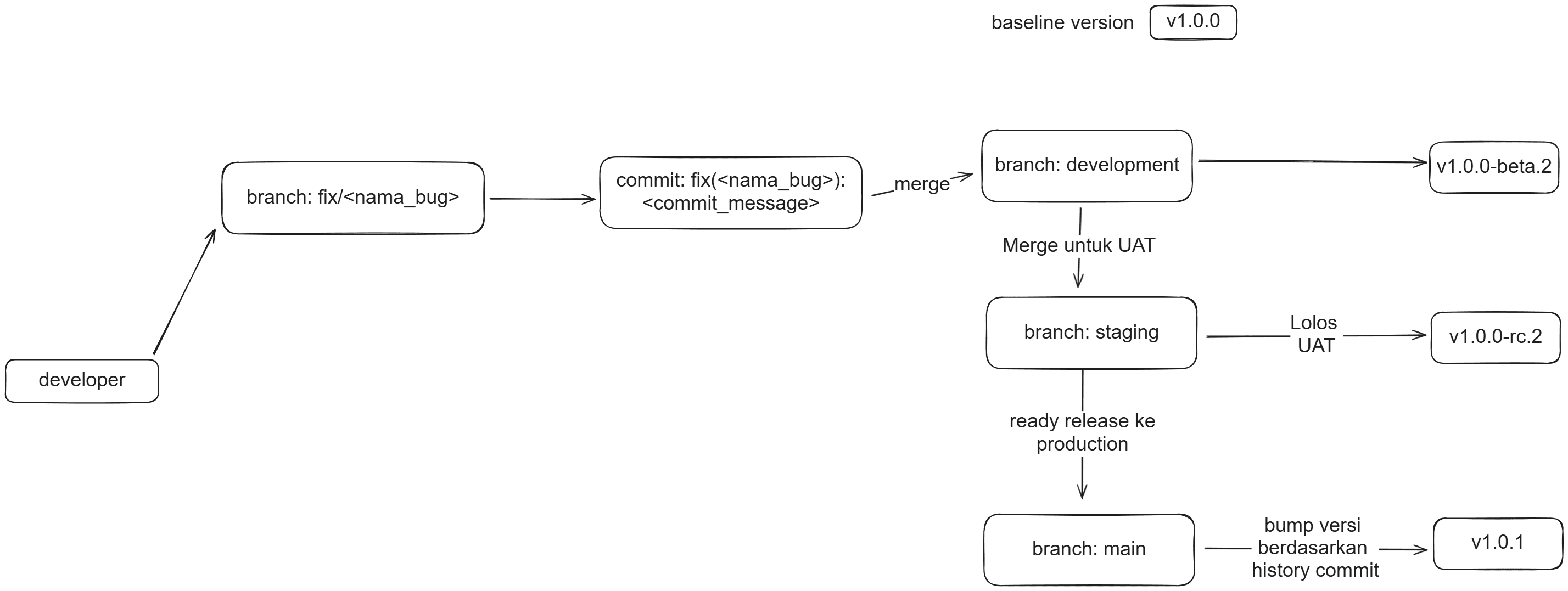 Git Flow Concepts
Semantic Versioning is often used in conjunction with Git Flow, a branching model in Git that helps maintain software version consistency in accordance with the stages in the software development life cycle (SDLC).
In Git Flow, there are several commonly used branch names that usually reflect the development environment, including the following:
devordevelopment
Used by developers or QA before the User Acceptance Testing (UAT) stage. At this stage, the release version is generally labeled beta, for example v1.5.7-beta.N (where N is the number of iterations of merge requests from features or bug fixes that are merged into this branch).
staging
Used when features or bug fixes that have passed the development stage are considered stable and ready to undergo User Acceptance Testing (UAT). At this stage, the release version is usually labeled rc or short for Release Candidate, for example v1.5.7-rc.N (where N is the number of merge request iterations from the dev or development branch that are merged into this branch).
main
Used when a feature or bug fix has passed the UAT stage, its stability is guaranteed, and it will be released to production or used by users. At this stage, the release version does not have any additional labels to indicate that it is a stable version, for example, v1.5.7.
#What is GitHub Container Registry (GHCR)?
GitHub Container Registry, or GHCR for short, is a storage place for container images. If you are familiar with Docker and often use images from Docker Hub, it is essentially the same thing, except that we store them in the GitHub package repository. This means that container images will have names in the following format
ghcr.io/<username>/<repository>:<tag>#What are Environments, Secrets, and Variables?
#Environments
Environments in GitHub Repository are names that represent deployments. Environments are usually used to separate values for secrets and variables that are used.
For example, if a deployment has two environments, such as staging and main (production). Both deployments will certainly use the same secret and variable key names, but what distinguishes them are the values of those secrets and variables.
The following is an example of secrets and variables between staging and main:
- Staging
# Secrets (Server Side)
DATABASE_CONNECTION_URL=postgresql://foo:bar@db-stag.svc.cluster.internal:5432/db_stag

# Variables (Client Side)
NEXT_PUBLIC_BASE_URL=https://nextjs-stag.svc.cluster.internal:3000- Main
# Secrets (Server Side)
DATABASE_CONNECTION_URL=postgresql://fizz:buzz@db-prod.svc.cluster.internal:5432/db_prod

# Variables (Client Side)
NEXT_PUBLIC_BASE_URL=https://nextjs-prod.svc.cluster.internal:3000#Secrets
Secrets in the GitHub repository are key value variables used to store sensitive data, such as information about tokens, database credentials, service accounts, jwt secrets, iam, and so on. These secrets will be censored if their values appear in the log when the CI/CD pipeline in GitHub Actions is running. For example, there are secrets with keys and values like this
JWT_ACCESS_TOKEN_SECRET=‘05f39d815bbe8e198c0c55f0323a4ed5’
JWT_REFRESH_TOKEN_SECRET=‘d723ebbbe45cafcb3936fd56a0bf86da’
So, when a job in the GitHub Actions workflow uses these secrets, what will appear in the log is
JWT_ACCESS_TOKEN_SECRET=‘****’
JWT_REFRESH_TOKEN_SECRET=‘****’Note: These secrets are commonly used to store server-side or runtime variables.
The value of these secrets cannot be viewed again once they have been successfully created, so make sure to store the value properly and correctly.
#Variables
Unlike secrets, variables are key value variables used to store non-sensitive data information, such as information about an application's base url, the application's deployment environment mode, and so on. The values of these variables will not be censored if they appear in the log when the CI/CD pipeline on GitHub Actions is running. An example of the use of key-value variables is as follows
NEXT_PUBLIC_APP_NAME=My Super App
NEXT_PUBLIC_APP_ENV=production
NEXT_PUBLIC_API_VERSION=v1
NEXT_PUBLIC_ANALYTICS_ENABLED=falseNote: These variables are commonly used to store variables that are Client Side or Build time in nature.
We can see the values of these variables again once they have been successfully created.
Related Posts
- Published On
- Published On
- Published On